Friday, October 18, 2013

Calibre, an excellent ebook/epub reader...


While reading the Linux news at Softpedia, I noticed an article about a ebook reader named Calibre.

I was skeptical at first, I've been hard pressed to find a better ebook reader for Linux platforms than FBReader.

I have to admit though that after using Calibre for a little while, it won me over.

FBReader is a fine ebook reader, but Calibre has a easier book addition system, an easier to use menu system, and a few functions I never even knew where possible for an ebook reader, like a ebook converter.

I love the store option.

If I could make changes, it would be that full screen wouldn't stretch the book to ridiculous portions, and I wish i could ad a website as a store, like JW.org.

Here is a list of features available thanks to http://calibre-ebook.com/about#features:

Library Management
E-book conversion
Syncing to e-book reader devices
Downloading news from the web and converting it into e-book form
Comprehensive e-book viewer
Content server for online access to your book collection

You can get Calibre here: http://calibre-ebook.com/

Ubuntu users can get Calibre from the Software Store, Synaptic, or through apt-get. (sudo apt-get install calibre)

If you have been looking for a good ebook reader, give Calibre a try.
-Denny

Thursday, October 17, 2013

Tech support forum snobbery sucks

After dealing with the "higher ups" on tech help forums, I can say with a certainty that 80 % of them are controlling angry ignorant people.

There are some real "diamonds in the rough" that take the time to listen to you, and explain themselves thoroughly.

So as a person who gives his time and talents to help people on these boards, I am publishing my etiquette list for those people you know that do this.

1) Don't tell me I do not need what I am asking for, I do.

2) Do not try to convince me I am wrong, I am not wrong. (I may be confused or under-educated)

3) If you (or the company) can't or won't do what I ask, tell me that.

4) Tell me why you won't do what I want or need you to do.

 5) READ THE WHOLE POST I HAVE MADE BEFORE YOU POST BACK

6) Above all, don't side track or try to dodge the question. Come at me straight with it. Say Yes or No to my request, and then say WHY you will or won't implement/solve the issue.

Now with all that said...

To the poster of said question/suggestion/comment

Type in clear complete english.

Broken english is sometimes nigh on impossible to figure out.

I have needed Captain Comix's decoder ring to figure out some of your posts.

I also love those people who put on such simple forum posts as:

----------

Dear Denny's Home World,

My computer doesn't work right.

Sincerely, 
-Ed.

----------

Details details details! What is the make/model of the computer? (I.E. Compaq Presario CQ57)

What exactly is it not doing correctly?

What software were/are you using?

What Operating System are you using? (Linux, Windows, what version? Windows 7? Windows 8? Xubuntu?)

Above all, if it isn't clear, precise and straight forward, please re-consider posting.
(Don't angry post either please.)     :)

Thanks for your time,
-Denny

Friday, October 4, 2013

Text Enhance, that frustrating, evil, underlined ad..


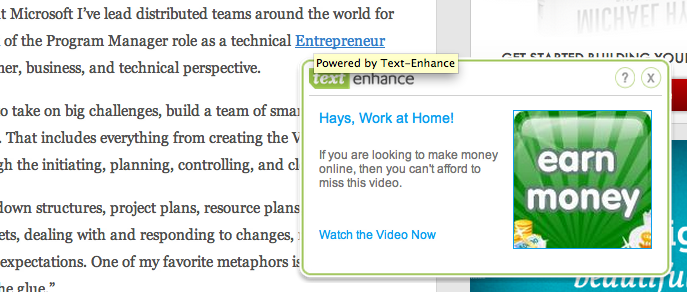
If you have ever been to a website injected with links that instantly pop up ads in your way blocking you from reading the article, you know what Text Enhance is.

Before I go on, here are some images showing you what I mean:


Text Enhance installs itself into your browser.. This has almost never been added by the webmaster.

Text Enhance doesn't ask you if you wanted it to be installed. It just installs itself quietly and invisibly.

-- Removing this junk --

I am glad to tell you removing Text Enhance is fairly easy.

First of all, it's not in the website, it's on your computer. Nearly 100% of the time, in fact.

Here is the quick howto for removal:

Removing Add-Ons/Extensions

Chrome: click on the wrench/3 bars at the top right, then select Tools, then Extensions and remove any extensions you don't remember installing.

IE: click Tools, then Manage Add-Ons and remove any extensions you don't remember installing.

Firefox: click Tools, then Add Ons and remove any extensions you don't remember installing.

If you go into extensions and find nothing extra there, then you may have to remove one extension after another until you find the culprit.

*Text Enhance sometimes calls itself a codec, it has also been known as Facetheme, Better Links, Vid Save or Vidsaver.

If you have removed your extensions only to find it's still there, then re-install any extensions you like along with adblock plus. This will stop it.

https://adblockplus.org/

Add/Remove Programs

Text Enhance can actually install itself, especially in older OS's like Windows XP.

In Windows XP, go into Control Panel and choose Add/Remove Programs and look for software you don't recognize. If in doubt, don't uninstall. Text Enhance can be listed under several names.

In Windows 7 go into Control Panel and choose Programs & Features. Again, if in doubt don't uninstall. It most likely won't be named "Text Enhance". (That would be too easy to remove then.)

If you could not find the culprit under extensions, add ons or the control panel in Windows, then you will need to install something like Spybot Search & Destroy, which is a free and very effective spyware/malware remover made by PepiMK Software.

I suggest downloading it from FileHippo.com. They are anal about virus testing their files, and they offer older versions and beta versions of the software they house.

The FileHippo link for Spybot S&D is here:
http://www.filehippo.com/download_spybot_search_destroy/

For Linux: The only thing that stopped it for me on my Chromium installation was adblock plus. It's free, and solved my issue immediately.

https://adblockplus.org/

I hope this has helped.
-Denny

Monday, September 30, 2013

GMediaFinder, a Minitube like Youtube player


Playing YouTube videos on a slow country internet connection that barely resembles broadband, I decided to hunt around for an alternative.

Playing the videos through a standard Chrome or Firefox browser window just wasn't going to cut it.

I needed something that would cut out all the other "fat" on the page, and just give me the stream. I had success earlier with a program called Minitube, but only if I downloaded the newest deb myself, and installed it with something like GDebi.

I wanted something with a ppa so I could get updates.

I will tell you now, that in ways, Minitube in it's heyday was far better. It currently doesn't work for me at all, so I am introducing an alternative.

GMediaFinder is a little clunky, has timed out from errors unbeknownst to me on rare occasion, as is just not polished.

All that said, it actually works well. It's faster than YouTube from a browser window, and actually can play video very well for me. Minitube refused to even give me search results last time I fired it up, which was several months ago.

Here's a shot of GMediaFinder playing a children's YouTube video fond to my nephews:


This article may seem negative toward GMediaFinder but it's not. It's still the best option I have found for playing YouTube.

I just want to be honest in my portrayal of the software.

To install GMediaFinder, open a terminal and then type each of these lines in (or copy and paste):

 sudo apt-add-repository ppa:s-lagui/ppa
 sudo apt-get update
 sudo apt-get install gmediafinder

-Denny

(P.S. In case you where wondering, the video is called the "Elephant song".)

Monday, September 23, 2013

Rock solid Fedora hits a mile stone


"Dear Fedora fans, it's time to celebrate 10 years of Fedora Linux, as ten years ago, on September 23, 2003, Michael K. Johnson announced the birth of the Fedora Project, which produces the Fedora Linux operating system." -Softpedia Linux News

For any Linux distribution to reach 10 years is an excellent show of stamina.

Sure, you have your "bigger". or more widely used distro's such as Fedora, Ubuntu, and OpenSuse to name a few.

But they all had that struggle at the beginning, and their have been so many Linux distro's that have not seen their 3rd anniversary either because of lack of interest, or because the project and the name have changed wildly from what they originally intended.

It's a testament to the Fedora team that not only have they made a Linux distro survive for 10 years, but they have also made a rock solid, reliable, beautiful operating system that does so much for their users and also for the Linux community as a whole.

While I am still a Ubuntu based user, many a times I have been tempted to switch to Fedora because of their mindset.

Fedora's focus us on being free, open to the community, sharing and having the best tech.

In the Linux community I am but one tiny voice, but still let me say congratulations to Fedora!

You hard working men and women of Fedora deserve the accolades you get.

-Denny

Monday, September 16, 2013

Clonezilla, the hard drive cloning tool

Clonezilla is a partition and disk imaging, or "cloning" program akin to Norton Ghost.

I started digging into using something like Clonezilla because I do a lot of Ubuntu installations, and wanted to speed things up.

Ubuntu installs fast enough, but including updates, program installs, and my favorite tweaks, it tends to be a lengthy process.

Clonezilla is an excellent way to back up your operating system in case of failure. It was impressively fast for me.

"Clonezilla is a partition and disk imaging/cloning program similar to True Image® or Norton Ghost®. It helps you to do system deployment, bare metal backup and recovery. Two types of Clonezilla are available, Clonezilla live and Clonezilla SE (server edition). Clonezilla live is suitable for single machine backup and restore. While Clonezilla SE is for massive deployment, it can clone many (40 plus!) computers simultaneously. Clonezilla saves and restores only used blocks in the harddisk. This increases the clone efficiency. At the NCHC's Classroom C, Clonezilla SE was used to clone 41 computers simultaneously. It took only about 10 minutes to clone a 5.6 GBytes system image to all 41 computers via multicasting!" -Clonzilla.org's about section

I used the Live CD. If you run a business that does mass cloning you will need Clonezilla SE. It's included in DRBL, so a DRBL server must first be set up in order to use Clonezilla to do mass cloning. (unicast, broadcast and multicast are supported)

The operating screens are nothing to write home about visually, but they are easy to use and follow.

Here's a little peak:

UN-officially i have been told that Clonezilla works quite well for Windows as well.

I can't vouch for this, because I don't use Windows.

Let me wrap this up by saying that at the time of writing this, Norton Ghost is normally $70 dollars.

So while I have nothing against this excellent software package, for those of us who are a fan of open source, or can't afford Ghost, consider Clonezilla for the job.

Thursday, September 12, 2013

Urukrama, your guide to Openbox


I am forever not happy with my desktop. It seems I have to change it at least once a month.

More often than not I find myself going back to a very simple XFCE set up.

One of my favorites though, is simple, lightweight and fast... It's Openbox
The wonderful problem with Openbox is that it starts you out with nothing but a grey blank desktop with a right click menu. (I mean there is absolutely nothing on the desktop, it is just a grey blank screen.)

I say "wonderful problem" because being so very generic upon install is intentional. The idea is to run Openbox, and then add apps to flush out the desktop of your dreams.

Some of the most imaginative and beautiful desktops I have ever seen have been Openbox with a nice wallpaper thanks to an app like feh, and a taskbar like tint2, and something like conky or gkrellm2.

While I mentioned apps here, there are so many more options than these, so don't just use what I mentioned here. do some digging first.

This is where Urukrama's web log comes in.

This weblog holds a Openbox guide that covers just about everything you would want or need to know about Openbox.

Urukrama doesn't tell you what you should use, but gives you so much information on the choices out there and the pros and cons of those choices that you can make an informed decision on your own.

Urukrama covers errors that crop up to, so if you have a situation with Openbox  or an associated app, it probably has been covered here already.

If you haven't clicked the pic above by now to check out the guide, you can get there from here:
http://urukrama.wordpress.com/openbox-guide/

Here are some screenshots of what people have done with Openbox:

I hope you give Openbox a try.

-Denny

P.S. screenshots thanks to Google's images search option.
https://www.google.com/imghp?hl=en&tab=wi