Wednesday, January 19, 2011

Sylpheed - lightweight e-mail client


If you are like me and have a pop3 or imap account or like to use the news boards, but you don't want the bloat of a huge program like Microsoft's Outlook or Mozilla's Thunderbird, then you may be interested in Sylpheed, a "lightweight and user-friendly e-mail client."

As the website states:

Sylpheed is a simple, lightweight but featureful, and easy-to-use e-mail client.

Sylpheed provides intuitive user-interface. Sylpheed is also designed for keyboard-oriented operation, so Sylpheed can be widely used from beginners to power users.

Sylpheed runs on many systems such as Windows, Linux, BSD, Mac OS X and other Unix-like systems.

Sylpheed uses GTK+ GUI toolkit. The newest version of Sylpheed works with GTK+ 2.4 or later (2.6 or later is recommended).

Sylpheed is a free software distributed under the GNU GPL (the library part is GNU LGPL). You can freely use, modify and redistribute it under the license.

Sylpheed has the following features. Read more...

* Simple, beautiful, and well-polished user interface
* Comfortable operationality which is built in detail
* Well-organized, easy-to-understand configuration
* Lightweight operation
* High reliability with one-mail-corresponding-to-one-file format
* Extensibility by plug-in faculty
* Powerful filtering and search
* Junk mail control
* Security features (GnuPG, SSL/TLSv1)
* Various protocols support
* Internationalization and Multilingualization support
* High-level Japanese processing
* Flexible cooperation with external commands

My personal reason for the use of Sylpheed is simplicity and speed.

And it works great for my google mail account, which is set up for pop3 via the settings menu.

If you would like to read more about Sylpheed or download it, the address is here:
http://sylpheed.sraoss.jp/en/

Wednesday, December 29, 2010

Ubuntu Tweak


If you use windows and like to change things that normally are either very hidden or are simply not given as an option to you then you probably use one of the famous tweak tools, such as TweakXP, or Microsoft's Power Toys add on.

Thankfully for those of us who use Ubuntu, their is available an app called Ubuntu Tweak.

As it states on their homepage, in the 'home' tab:

"Ubuntu Tweak is an application to config Ubuntu easier for everyone.

It provides many useful desktop and system options that the default desktop environment doesn't provide.

With its help, you will enjoy with the experience of Ubuntu!"

Here is a list of some of the features available though Ubuntu Tweak:

Features of Ubuntu Tweak

* View of Basic System Information (Distribution, Kernel, CPU, Memory, etc.)
* GNOME Session Control
* Auto Start Program Control
* Quick install popular applications
* A lot of third-party sources to keep applications up-to-date
* Clean unneeded packages or cache to free disk space
* Show/Hide and Change Splash screen
* Show/Hide desktop icons or Mounted Volumes
* Show/Hide/Rename Computer, Home, Trash or Network icon
* Tweak Metacity Window Manager's style and behaviour
* Compiz Fusion settings, Screen Edge Settings, Window Effect Settings, Menu Effect Settings
* Set the Shortcuts to archive quicker access your favourite applications
* GNOME Panel Settings
* Nautilus Settings
* Advanced Power Management Settings
* System Security Settings
* And many other in process...

If you would like this app for yourself, it's available at http://ubuntu-tweak.com/

Monday, November 29, 2010

GIMP is no gimp!


G.I.M.P. (GNU Image Manipulation Program) is an amazing piece of software.

If you are interested in photo editing, artwork, advertisement or any other use you may have for digital images, this program can change them in any way you see fit.

If you are a graphic design student you know Adobe Photoshop and GIMP intimately.

What's special about GIMP?

GIMP can quite literally do everything Photoshop can do, minus the very expensive price.

Adobe's Photoshop runs at about $199.00 for the professional version.

GIMP is free.

It's hard for me to do an decent job describing just how usefull this program is, being I don't personally use this software very often, or for much more than simple tasks, so here is what the programmers have to say about their unique image editor:

"GIMP is an acronym for GNU Image Manipulation Program. It is a freely distributed program for such tasks as photo retouching, image composition and image authoring.

It has many capabilities. It can be used as a simple paint program, an expert quality photo retouching program, an online batch processing system, a mass production image renderer, an image format converter, etc.

GIMP is expandable and extensible. It is designed to be augmented with plug-ins and extensions to do just about anything. The advanced scripting interface allows everything from the simplest task to the most complex image manipulation procedures to be easily scripted."

The feature list: (not complete)

* Painting
o Full suite of painting tools including Brush, Pencil, Airbrush, Clone, etc.
o Sub-pixel sampling for all paint tools for high quality anti-aliasing
o Extremely powerful gradient editor and blend tool
o Supports custom brushes and patterns
* System
o Tile based memory management so image size is limited only by available disk space
o Virtually unlimited number of images open at one time
* Advanced Manipulation
o Full alpha channel support
o Layers and channels
o Multiple Undo/Redo (limited only by diskspace)
o Editable text layers
o Transformation tools including rotate, scale, shear and flip
o Selection tools including rectangle, rounded rectangle, ellipse, free, fuzzy
o Foreground extraction tool
o Advanced path tool doing bezier and polygonal selections.
o Transformable paths, transformable selections.
o Quickmask to paint a selection.
* Extensible
o A Procedural Database for calling internal GIMP functions from external programs as in Script-fu
o Advanced scripting capabilities (Scheme, Python, Perl)
o Plug-ins which allow for the easy addition of new file formats and new effect filters
o Over 100 plug-ins already available
* Animation
o Load and save animations in a convenient frame-as-layer format
o MNG support
o Frame Navigator (in GAP, the GIMP Animation Package)
o Onion Skin (in GAP, the GIMP Animation Package)
o Bluebox (in GAP, the GIMP Animation Package)
* File Handling
o File formats supported include bmp, gif, jpeg, mng, pcx, pdf, png, ps, psd, svg, tiff, tga, xpm, and many others
o Load, display, convert, save to many file formats
o SVG path import/export
* Much, much more!

If you are interested in GIMP the official website is here.

(Thank you for the reminder, Andrew.)

Wednesday, November 17, 2010

picascii not picasso

In my search for unusual or opensource software, i found a unique website.

If you have ever seen "ascii art" then you know what i mean.

If not here is a small demonstration:


Notice how the picture is made of keyboard characters? (0-9), (a-z)?

That's ASCII art.

As Wikipedia states:

"ASCII art is a graphic design technique that uses computers for presentation and consists of pictures pieced together from the 95 printable (from a total of 128) characters defined by the ASCII Standard from 1963 and ASCII compliant character sets with proprietary extended characters (beyond the 128 characters of standard 7-bit ASCII)."

picascii.com is a website that takes photos and turns them into ascii art.

If you are interested in making a picture of yours ascii'd, here is the website:


-Denny

Monday, October 25, 2010

FileHippo

I want to mention FileHippo because it is one of my favorite places to download the software I and my clients use.

I like FileHippo because they have a running list of all the available versions of a software title, not just the latest version, and they keep me informed as to what is the latest via this process.

Also most if not all of the software is free, with a little of it being free trial.

Here is what FileHippo has to say for themselves:

"With FileHippo.com our aim is to provide you with the simplest method of downloading the newest versions of the best software - without the usual excessive popups or spyware and without the low quality software.
Features

* Only the best software, we focus on quality not quantity.
* Very fast servers with 100Mb connections, to make your downloads as fast as possible.
* We keep the old versions of programs, so if you update and don't like the new version, you can always return to the old one.
* All software is 100% spyware and virus free.
* Filtering feature to allow you to only show Freeware and/or Non-beta software.
* Full support for resuming downloads and download managers.
* Change log and technical details for downloads.
* RSS feeds for all updates, categories and for individual programs.
* New European and US download servers.
* Optimized pages for faster browsing.
* Update Checker to scan your machine for old software."


-Denny

Monday, October 18, 2010

Amusing myself - Cowsay

I was messing around with programs you can run straight from the terminal in linux and found a program called cowsay.

It's a goofy little entirely useless program that puts in ascii art whatever you tell the cowsay command to do.

For instance: "cowsay Welcome to Dennys Homeworld" (minus the quotes) produced this:

(I added the apostrophe afterwards...)


Well atleast it gave me something to write about. There are actually quite a lot of apps for terminal alone, and if you dont mind getting out of gui for a while it's kind of fun to mess around with.

Some are very beneficial like lynx which doesnt open any images and is strictly text, which can protect you from virus attacks and the like.

-Denny

Sunday, September 5, 2010

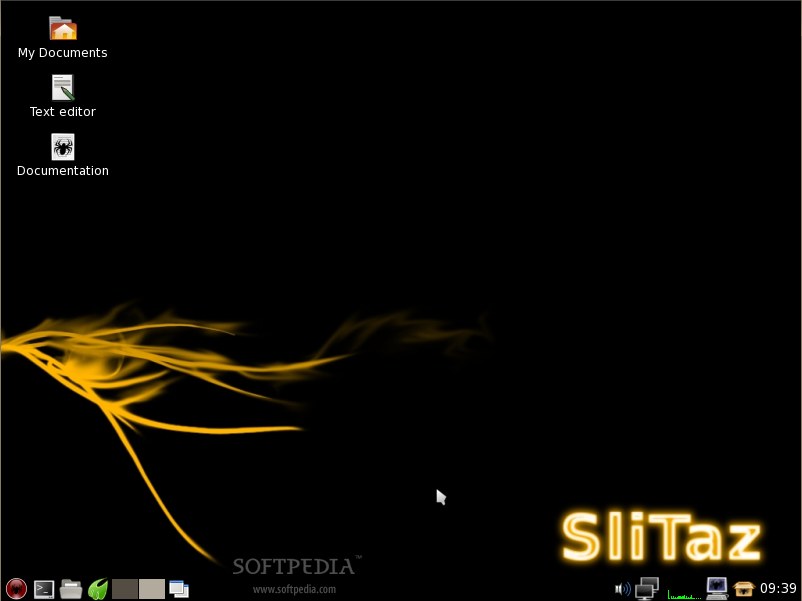
Slitaz

As I mentioned earlier, I was looking for an os that not only was as compact as possible (like Damn Small Linux) but also capable of being a full featured os if need be.

Well I found it in Slitaz.

The Slitaz people have done what I thought was impossible... a fully functional os in a 30 mg iso!

I installed Slitaz natively to see if it could live up to my hopes and dreams.

In about 20 minutes I was running firefox with java support, flashplayer support, full graphics driver support, and ready to rock!

Then I installed virtualbox and ran windows xp from a vbox hd file i had created earlier...

I am totally impressed with Slitaz,

It's my newest weapon in my arsenal of computer repair as well.

With very quick boot times and the ability to read and write to ntfs, I use it to fix Windows PC's.

I give Slitaz 10 out of 10 stars!


You can download it here:

Slitaz at Softpedia